1. Overview
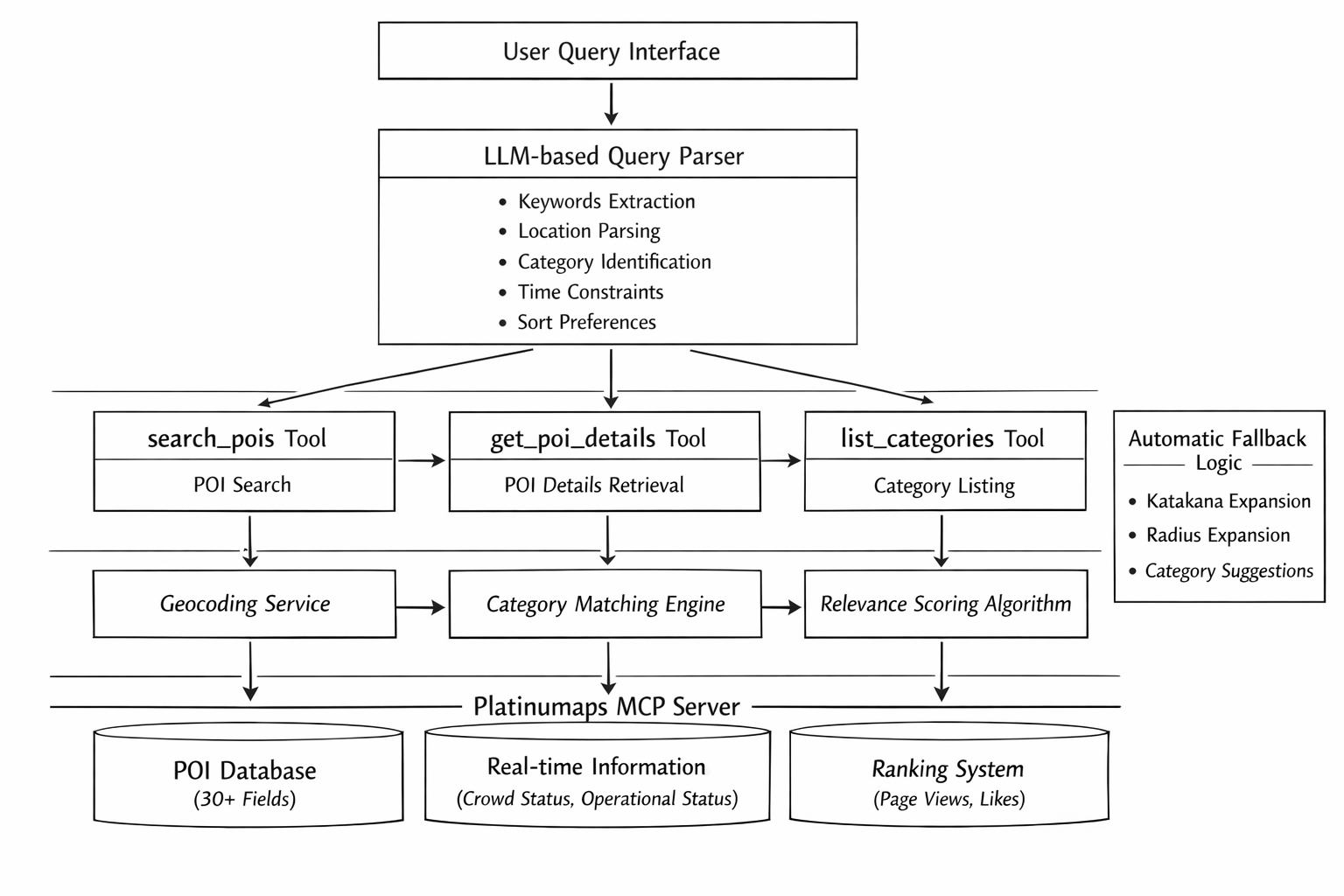
The Platinumaps MCP Server is a Model Context Protocol (MCP) server that enables AI agents and RAG systems to retrieve POI (Point of Interest) data from Platinumaps digital maps.
It accepts natural language search queries in Japanese (e.g., "ramen shops I can visit right now in Shibuya", "popular spots"), internally converts them into structured search parameters using an LLM, and executes the search. Through three tools, you can search for POIs, retrieve detailed information, and list available categories.
Key features:
- Japanese natural language POI search (LLM routing)
- Rich POI data with 30+ fields (business hours, fees, access, images, etc.)
- Real-time crowd status and waiting time information
- Popularity ranking search (by page views and likes)
- Category facets (hit counts per category)
- Automatic fallback on zero results (radius expansion, category suggestions)
- Search process transparency (SearchContext metadata)
2. Connection
Authentication
Authentication is required to connect to the MCP server. Two authentication methods are supported.
Method 1: API Key Authentication
Send the API key via HTTP header or query parameter.
// HTTP Header (recommended)
Platinumaps-Api-Key: your-api-key
Method 2: OAuth 2.1 Authentication (Azure AD / Entra ID)
JWT Bearer authentication via the MCP SDK's built-in OAuth 2.1 flow. MCP clients (e.g., Claude Desktop) handle the OAuth flow automatically.
Transport
Uses the MCP SDK standard Streamable HTTP transport. Configure the server URL and API key in your MCP client settings (Claude Desktop, Cursor, etc.).
3. Available Tools
This MCP server provides three tools.
3.1 search_pois — POI Search
Search for POIs on the map using natural language queries or coordinate-based searches. Natural language input is automatically parsed by an LLM into keywords, location, category, time constraints, and sort order.
Parameters
| Name | Type | Default | Description |
|---|---|---|---|
query |
string | null | Natural language search query. Examples: "ramen shops in Shibuya open now", "Sensoji Temple", "popular spots". The LLM automatically extracts keywords, location, category, and time constraints. |
lat |
double | null | Latitude (-90 to 90). Overrides the location extracted from the query. |
lng |
double | null | Longitude (-180 to 180). Use together with lat. |
radius |
int | 2000 | Search radius in meters. Range: 10–20,000. |
limit |
int | 10 | Maximum number of results. Range: 1–50. |
offset |
int | 0 | Pagination offset. Use with HasMore in the response. |
north |
double | null | Bounding box north latitude. All four bounds (north/south/east/west) are required together. |
south |
double | null | Bounding box south latitude. |
east |
double | null | Bounding box east longitude. |
west |
double | null | Bounding box west longitude. |
Response Structure
search_pois returns the following response structure.
{
  "TotalCount": 15,
  "Offset": 0,
  "HasMore": true,
  "Context": {
    "ParsedKeyword": "ramen",
    "ParsedLocation": "Shibuya",
    "ParsedCategory": "Ramen",
    "LocationGeocoded": true,
    "AppliedRadiusMeters": 2000,
    "RadiusExpanded": false,
    "SuggestedCategories": null,
    "DetectedIntent": "search",
    "IsRankingResult": false,
    "RankingType": null
  },
  "CategoryFacets": [
    { "CategoryId": 10, "CategoryName": "Ramen", "Count": 12 },
    { "CategoryId": 20, "CategoryName": "Gourmet", "Count": 3 }
  ],
  "Guidance": null,
  "Items": [
    {
      "Id": 12345,
      "Name": "Menya Shibuya",
      "Address": "Shibuya-ku, Tokyo...",
      "Latitude": 35.6612,
      "Longitude": 139.7035,
      "DetailUrl": "https://platinumaps.jp/d/...",
      "SubTitle": "Authentic Tonkotsu Ramen",
      "PhoneNumber": "03-1234-5678",
      "BusinessHour": "11:00-23:00",
      "Fee": null,
      "Parking": "None",
      "Transportation": "5 min walk from Shibuya Station",
      "Tags": ["Photo Spot"],
      "Categories": ["Ramen"],
      "DistanceMeters": 350.5,
      "RelevanceScore": 92.3
    }
  ]
}get_poi_details. 3.2 get_poi_details — POI Detail Retrieval
Retrieve full detailed data with 30+ fields by specifying a POI ID from search_pois results. Use this tool instead of re-searching for follow-up questions (business hours, parking, crowd status, etc.).
Parameters
| Name | Type | Description |
|---|---|---|
id Required |
long | POI ID from search_pois results. |
Response (30+ Fields)
get_poi_details returns the following full POI information.
| Field | Type | Description |
|---|---|---|
Id |
long | POI ID |
Name |
string | Facility name |
SubTitle |
string? | Subtitle / tagline |
Address |
string? | Address |
Address2 |
string? | Address line 2 (building name, etc.) |
PostCode |
string? | Postal code |
Latitude / Longitude |
double | Geographic coordinates |
Description |
string? | Description (plain text) |
ListDescription |
string? | Short description for list display |
DetailUrl |
string | Platinumaps detail page URL |
Media |
MediaItem[]? | Banner images (Url, Type, Credit, Width, Height) |
PhoneNumber |
string? | Phone number |
BusinessHour |
string? | Business hours (text) |
NonBusinessHour |
string? | Closed days |
BusinessHoursStructured |
DayHours[]? | Structured hours per day (Day, Open, Close, IsClosed) |
WebUrl |
string? | Official website URL |
Fee |
string? | Fee / admission information |
Parking |
string? | Parking information |
Transportation |
string? | Access / directions |
CreditCard |
string? | Accepted payment methods |
Remarks |
string? | Additional remarks |
CrowdStatus |
string? | Current crowd level (real-time) |
CrowdStatusUpdatedAt |
DateTime? | Crowd status last updated |
WaitingTimeMinutes |
int? | Waiting time (minutes) |
WaitingTimeLabel |
string? | Waiting time label (e.g., "approx. 15 min wait") |
WaitingTimeUpdatedAt |
DateTime? | Waiting time last updated |
OperationalStatus |
string? | Operational status (temporarily_closed, etc.) |
EventPeriod |
string? | Event period (text) |
EventFrom / EventTo |
DateTime? | Event start / end dates |
AttentionTitle |
string? | Attention / warning title |
AttentionMessage |
string? | Attention / warning message |
PopularityRank |
int? | Popularity rank (ranking queries only) |
ViewCount |
int? | Page views (past 30 days) |
LikeCount |
int? | Like count |
Tags |
string[]? | Spot tags (e.g., "Photo Spot", "Stroller OK") |
Categories |
string[]? | Category names (e.g., "Ramen", "Gourmet") |
DistanceMeters |
double? | Distance from search point (meters) |
RelevanceScore |
double? | Relevance score (0–100) |
null, it means "this information is not available for this facility" — not a data retrieval error. 3.3 list_categories — Category Listing
Retrieve a list of all available POI categories on the map. No parameters are required. Use this to inform users about what types of places are available or to refine search queries.
Response (CategoryItem)
| Field | Type | Description |
|---|---|---|
Id |
long | Category ID |
Name |
string | Category name (e.g., "Ramen", "Cafe") |
ParentCategoryId |
long? | Parent category ID |
ImageUrl |
string? | Category image URL |
IsRecommended |
bool | Whether this is a recommended category |
SortOrder |
int | Display order |
4. Response Specification
SearchContext — Search Process Metadata
The search_pois response includes a Context field with details about the search process. AI agents can use this information to explain the search to users.
| Field | Description |
|---|---|
ParsedKeyword |
Keyword extracted by the LLM |
ParsedLocation |
Location name extracted by the LLM (used for geocoding) |
ParsedCategory |
Category name extracted by the LLM |
LocationGeocoded |
Whether the location was successfully geocoded to coordinates |
AppliedRadiusMeters |
Actual search radius applied |
RadiusExpanded |
Whether the radius was automatically expanded (original search returned 0 results) |
SuggestedCategories |
When results are 0, a list of available categories on this map |
DetectedIntent |
Query intent classification (search / attribute_question / followup / greeting / other) |
IsRankingResult |
Whether this is a ranking search result |
RankingType |
Ranking type ("pv" = page views / "like" = likes) |
CategoryFacets — Per-Category Hit Counts
Search results include per-category hit counts, useful for refining results.
"CategoryFacets": [
  { "CategoryId": 10, "CategoryName": "Ramen", "Count": 12 },
  { "CategoryId": 20, "CategoryName": "Cafe", "Count": 8 }
]
RelevanceScore — Relevance Score
Each POI is assigned a relevance score from 0 to 100 (100 being the most relevant). Scores are normalized relative to the maximum score in the search results.
Guidance — Instructions for AI Clients
In certain situations (zero results, follow-up detection, etc.), the Guidance field contains instructions for the AI client on what action to take next.
5. Search Features
Natural Language Queries
Simply enter natural language in the query parameter, and the LLM will automatically extract the following elements.
- Keywords — Facility name or genre (e.g., "ramen", "Sensoji Temple")
- Location — Place name (e.g., "Shibuya", "near Tokyo Station") — auto-geocoded
- Category — Automatically matched to map categories
- Time constraints — "open now", "currently available", etc.
- Sort order — "nearby", "popular", "newest", etc.
Sort Options
Sorting is automatically applied based on expressions in the query.
| Query Expression | Sort Order |
|---|---|
| "nearby", "around here" | Distance (nearest first) |
| "newest", "recently updated" | Update date (most recent first) |
| "alphabetical", "by name" | Name (alphabetical order) |
| "popular", "recommended", "ranking" | Popularity (by page views or likes) |
| (none specified) | Relevance (default) |
Multi-Category OR Search
Queries like "cafe or tea house" are automatically processed as multi-category OR searches.
Bounding Box Search
Specify all four bounds (north/south/east/west) to search for POIs within a map viewport. All four parameters are required together.
Zero-Result Fallback
When search results are zero, the server automatically performs a three-stage fallback.
- Katakana variant expansion — Retries with character variant expansions
- Automatic radius expansion — Triples the search radius and retries
- Category suggestions — Presents a list of available categories on the map
Context.RadiusExpanded being true indicates that the radius was automatically expanded.
6. Popularity Ranking Search
Queries such as "popular spots?", "recommended places?", or "show ranking" trigger a ranking search based on page views or likes.
Ranking Types
| Type | Data Source | Response Fields |
|---|---|---|
| PV Ranking | Page views in the past 30 days | PopularityRank, ViewCount |
| Like Ranking | Like count | PopularityRank, LikeCount |
Ranking availability is configured per map. For maps where ranking is disabled, the Guidance field will indicate this.
7. Pagination
Search results support pagination. Use the offset and limit parameters to control the range of results.
// Page 1 (default)
search_pois(query: "cafe", limit: 10, offset: 0)
→ { TotalCount: 45, HasMore: true, Offset: 0, Items: [...] }

// Page 2
search_pois(query: "cafe", limit: 10, offset: 10)
→ { TotalCount: 45, HasMore: true, Offset: 10, Items: [...] }

// Last page
search_pois(query: "cafe", limit: 10, offset: 40)
→ { TotalCount: 45, HasMore: false, Offset: 40, Items: [...] }
When HasMore is true, a next page exists.
8. Conversation Flow and Follow-Ups
This MCP server is stateless. Each tool call is independent and does not remember previous call results. The AI agent must manage conversation context (e.g., remembering POI IDs) on the client side.
Recommended Conversation Flow
Follow-Up Detection Rules
The following types of queries should be treated as follow-ups. Use get_poi_details instead of search_pois.
- "What are the hours?" / "How late is it open on weekends?"
- "Is there parking?"
- "What's the phone number?"
- "How do I get there?" (access information)
- "Is it crowded?" (crowd status)
- "How much does it cost?"
- "Tell me more about it"
- "Show me photos"
search_pois again for follow-up questions. Use the POI ID from the previous search results to call get_poi_details. Intent Classification
The server classifies query intent into five categories, returned via Context.DetectedIntent.
| Intent | Description | Server Behavior |
|---|---|---|
search |
POI search | Executes a standard search |
attribute_question |
Question about attributes | Executes a search (keyword-based) |
followup |
Follow-up question | Returns all POIs on the map + Guidance message |
greeting |
Greeting | Empty result with Guidance message |
other |
Other | Empty result with Guidance message |
9. Usage Examples
Basic Search
// Natural language search
search_pois(query: "ramen shops in Shibuya open now")

// Search for a specific place
search_pois(query: "Sensoji Temple")

// Coordinate-based nearby search
search_pois(lat: 35.6762, lng: 139.6503, radius: 500)

// Limit number of results
search_pois(query: "hotels near Tokyo Station", limit: 5)
Popularity Ranking
// Map-wide popularity ranking
search_pois(query: "popular spots?")

// Category-filtered ranking
search_pois(query: "recommended cafes")

// Show ranking
search_pois(query: "show ranking")
Viewport Search
// Get POIs within a map viewport
search_pois(
  north: 35.68,
  south: 35.67,
  east: 139.71,
  west: 139.69
)
Pagination
// Page 1
search_pois(query: "cafe", limit: 10, offset: 0)

// Page 2
search_pois(query: "cafe", limit: 10, offset: 10)
Detail Retrieval
// Use the ID obtained from search_pois
get_poi_details(id: 12345)
Category Listing
// Check available categories
list_categories()
Multi-Category Search
// OR search across multiple categories
search_pois(query: "cafe or tea house")
10. FAQ
Q. What should I do when search results are zero?
The server automatically performs radius expansion and category suggestions. Follow the instructions in the Guidance field. You can also use Context.SuggestedCategories to suggest available categories to the user.
Q. Crowd information is returned as null. Is this an error?
No. When CrowdStatus, WaitingTimeMinutes, etc. are null, it means "this information is not registered for this facility." It is not a data retrieval error.
Q. Which tool returns images (Media)?
Images are included in the get_poi_details response. The search_pois list results do not include images. However, when search_pois returns only one result, it is automatically enriched with full details including images.
Q. Ranking search is not working.
The ranking feature is enabled/disabled per map. For disabled maps, the Guidance field will indicate this. Ask the map administrator to enable ranking settings.
Q. Can I change the language of search results?
Currently, only Japanese is supported. Multi-language support is planned for a future update.
Q. Can I use search_pois for follow-up questions?
Not recommended. Use get_poi_details(id) for follow-up questions. Calling search_pois again may return different results, degrading the user experience.
Q. What happens when both API key and OAuth authentication are configured?
The API key (Platinumaps-Api-Key header) takes priority. If both are set with different values, only API key authentication is executed.
Q. Why do I get additional fields when there is only a single result?
When search_pois returns only one result, the server automatically enriches it with full detail data (Description, Media, CrowdStatus, etc.). In this case, you do not need to call get_poi_details again.